
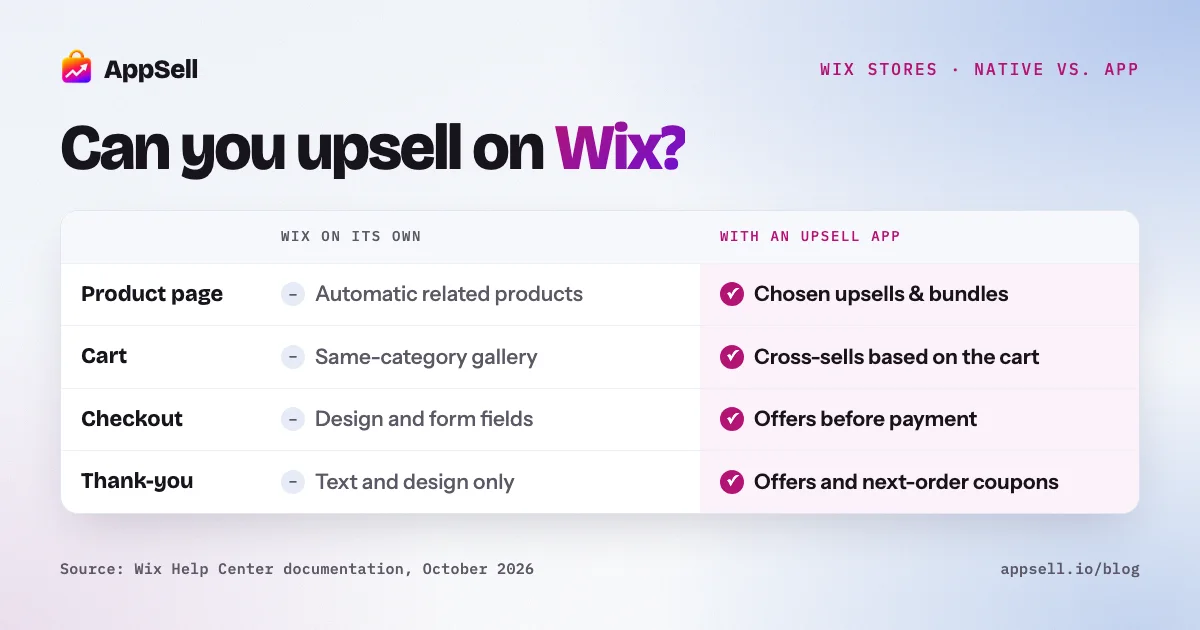
Yes, you can upsell on Wix, but not with Wix alone. Wix Stores has a few native tools that nudge order value up: a Related Products gallery, automatic discounts, subscriptions, and free shipping above a set amount. What it doesn’t have is a way to put an upsell or cross-sell offer in the cart, at checkout, or on the product page. Wix’s own help center lists both as feature requests. Those offers come from an app.
This guide covers what Wix can do on its own, where it stops, and how to decide what to add.
Wix upselling at a glance
- Native: Related Products gallery (3 automatic modes), automatic discounts (one per item), up to 10 quantity discounts per site, product subscriptions, and a free-shipping threshold.
- Not native: targeted upsell or cross-sell offers in the cart, side cart, checkout, product page or thank-you page.
- Post-purchase: not one-click on Wix. Customers re-enter payment and address details to accept.
- Options: an app from the Wix App Market, or custom code with Velo.
What can Wix Stores do on its own to raise order value?
Five native tools help, and none of them is a targeted upsell offer. Each is worth setting up before you add anything else, because an app works best on top of them, not instead of them.
The Related Products gallery
You add the gallery in the Editor and choose how it picks products:
- From the same categories. Wix suggests this mode for the product page, cart or thank-you page.
- Frequently bought together.
- Frequently viewed together.
Wix recommends the product page as the best place for the gallery. It’s a recommendation strip, not an offer: the products are chosen automatically, Wix’s documentation doesn’t describe a way to hand-pick them, and you can’t attach a discount to the suggestion. Our guide to related products on Wix explains how it ranks products and how to steer it.
Automatic discounts
Automatic discounts are the closest thing Wix has to a native offer. You can give a percentage or an amount off, apply it to all items, specific items or a group, and require:
- a minimum quantity (buy 3, save 15%)
- a minimum order subtotal (spend $80, save 10%).
You can also limit a discount to specific customer segments or schedule it for set dates.
Wix also supports Buy X Get Y discounts and up to 10 quantity discounts per site. The catch: only one automatic discount applies to each item in an order, so overlapping promotions don’t stack. For tiers, margin math and the product-page visibility problem, see our guide to volume discounts on Wix.
Mix-and-match bundles
Wix builds bundles out of automatic discounts. You put the eligible products in one category and set a minimum quantity, such as any 4 for 10% off. Two limits to know:
- A bundle discount can’t span several categories. The workaround is a new category that holds all the bundle’s products.
- Customers can still buy the items one at a time. The discount only kicks in at the required quantity.
For fixed bundles, inventory and the other bundle types, see our guide to product bundles on Wix.
Product subscriptions
Wix Stores can sell physical products by subscription, with a fixed or percentage discount off the regular price. You can offer the subscription alongside a one-time purchase, which works as a built-in “subscribe and save” upsell for products people reorder. Each product can have up to 6 subscription options, and you need a payment provider that supports recurring payments.
Free shipping above a set amount
In your shipping rules there’s a checkbox for free shipping once an order passes a subtotal you choose. Rate-by-price rules can do the same by setting the top price range to $0. It’s one of the simplest ways to lift order value. But Wix’s free-shipping documentation doesn’t describe an on-site message telling shoppers how close they are to the threshold, and the threshold only helps if customers know it’s there. Set it a little above your typical order, so most shoppers are one small item away from qualifying. Our guide to the Wix free shipping threshold shows how to pick the amount so it pays for itself.
What can’t Wix do without an app?
Wix has no native way to show a targeted offer at the moments when customers are most likely to add something. Going through each page of the purchase:
- Product page. Beyond the Related Products gallery, Wix can’t show an upsell or an “add this too” offer. Wix lists this as a feature request.
- Cart and side cart. Wix has no built-in cross-sell or upsell in the cart or checkout, also listed as a feature request. Side cart settings cover which elements show, the design, and the text, but not product suggestions.
- Checkout. You customize the checkout from the dashboard: design, form fields, policies and payment settings. Wix doesn’t describe a way to add a product or offer there.
- Thank-you page. You can show or hide elements, change the design, and edit the text and the Continue Browsing link. That’s all. Nothing on the page itself lets you show a product or an offer.
Wix on its own vs. with an upsell app
| Where | Wix on its own | With an upsell app |
|---|---|---|
| Product page | Related Products gallery, picked automatically | A chosen upsell, bundle or quantity offer, optionally discounted |
| Cart | Same-category gallery on the cart page | A cross-sell triggered by what’s in the cart |
| Checkout | Design, fields and policies only | An offer before the customer pays |
| Thank-you page | Text, design and show/hide only | A product offer or a coupon for the next order |
| Bundles | One category per bundle discount | Bundles from products in any category |
| Quantity discounts | Automatic discounts, one per item | Discount tiers shown as an offer on the product page |
| Free shipping | A threshold in your shipping rules | Depends on the app |
How do upsell apps work on a Wix store?
You install the app from the Wix App Market and build offers in its dashboard. The offers then appear on your store’s pages without changes to your template. The details vary by app, but setting up an offer usually means four choices:
- The offer type: an upsell or cross-sell, a volume bundle, or a frequently-bought-together set.
- Where it appears: the product page, cart, checkout or thank-you page.
- When it appears: for example, only when a specific product is in the cart, or above a minimum cart value.
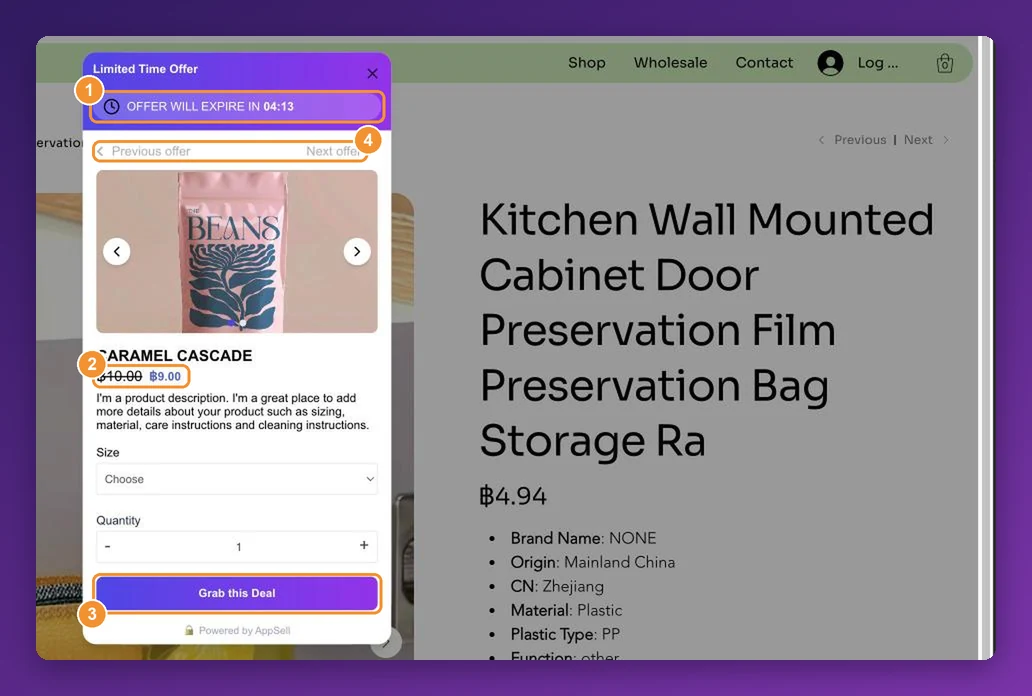
- How it looks: a popup over the page, or a section built into the page, styled to match your store.
Most apps let you discount the offered product as well, which is often what turns a suggestion into a yes.
What about post-purchase upsells on Wix?
On Wix, a post-purchase offer isn’t one-click: the customer has to enter their payment and address details again to accept it. That’s a limitation of the Wix platform, not a setting in any app.
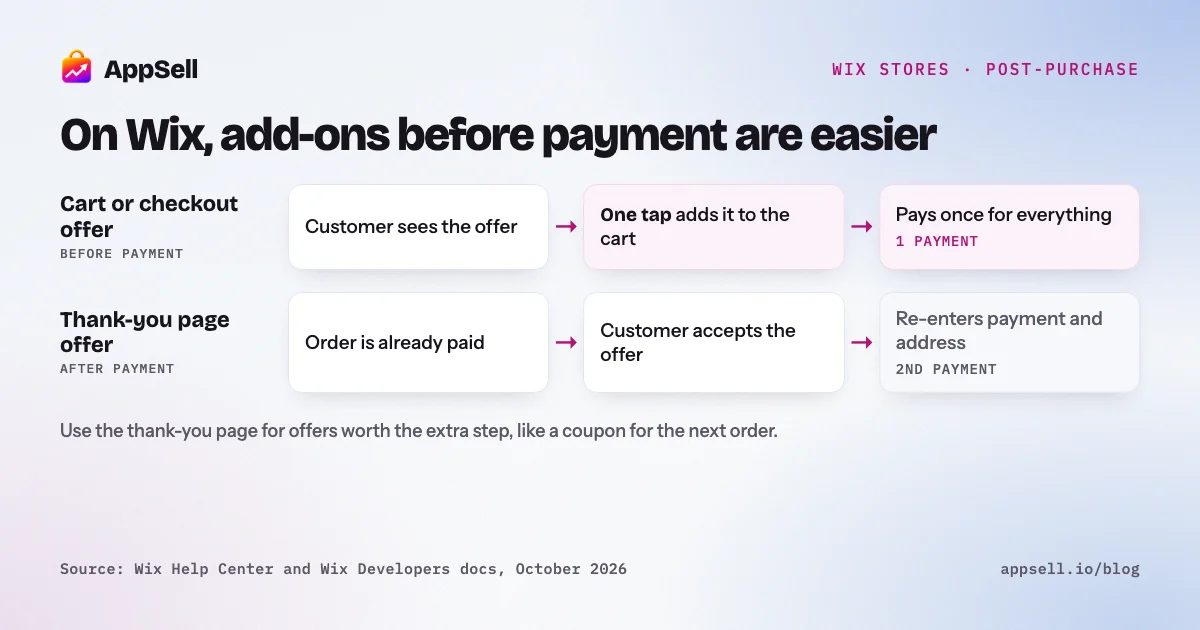
It doesn’t make the thank-you page useless, but it changes what belongs there:
- Put impulse add-ons before payment. A low-priced accessory converts best in the cart or at checkout, where adding it costs the customer one tap rather than a second round of form-filling.
- Use the thank-you page for offers worth the extra step, such as a discount on a strongly related product, or a coupon for the next order, which asks nothing of the customer right now.
For how this compares with Shopify and WooCommerce, see post-purchase upsells by platform.
Can you build upsells with Velo instead?
Yes, if you write code. Velo, Wix’s development platform, lets developers build custom recommendation and offer logic. Wix publishes a Velo tutorial for cross-selling a product on the cart page. You then own that code: building it, testing it on every template change, and maintaining it. For most stores an app is faster and easier to keep running. AppSell’s help center has a walkthrough comparing the two approaches.
Where should a Wix store start?
Start where the customer is already deciding, and add one offer at a time. A sensible order:
- Set a free-shipping threshold just above your typical order, and say so on the site.
- Add one cart cross-sell: a low-priced, clearly related add-on.
- Add a quantity discount on the product page for products people buy again or in multiples.
- Use the thank-you page for a next-order coupon rather than a second purchase.
Measure each step before adding the next. Too many offers at once makes it impossible to tell which one worked, and starts to feel pushy to customers.
Setting it up with AppSell
AppSell is an upsell and cross-sell app on the Wix App Market, rated 4.8 stars from 304 reviews and Verified by Wix. It runs offers on the product page, cart, checkout and thank-you page, with upsell and cross-sell, volume bundle and frequently-bought-together offer types. See what it adds to a Wix store on the AppSell for Wix page, or compare plans on the pricing page.
Frequently asked questions
- Does Wix have a built-in upsell feature?
- No. Wix Stores can show a Related Products gallery and run automatic discounts, but it has no built-in way to put an upsell or cross-sell offer in the cart, at checkout or on the product page. Wix lists both as feature requests in its help center. To run those offers you need an app from the Wix App Market or custom Velo code.
- Can I upsell on Wix without an app?
- Partly. Without an app you can show a Related Products gallery, run automatic and quantity discounts, sell subscriptions at a discount, and offer free shipping above a set order amount. Showing a targeted offer in the cart, at checkout, on the product page or on the thank-you page needs an app or custom Velo code.
- Can I add products to the Wix thank-you page?
- Not natively. Wix lets you show or hide the page's elements, change its design, and edit its text and the Continue Browsing link. Showing a product or an offer there takes an app.
- Can I choose which products the Wix Related Products gallery shows?
- Wix's documentation describes three automatic modes: products from the same categories, frequently bought together, and frequently viewed together. It does not describe hand-picking products or attaching a discount to the suggestion.
- Can Wix do volume or quantity discounts?
- Yes, with automatic discounts. You can require a minimum quantity or a minimum subtotal, and create up to 10 quantity discounts per site. Only one automatic discount applies to each item in an order.
- Is a post-purchase upsell on Wix one-click?
- No. On Wix, a customer who accepts an offer after placing an order has to enter their payment and address details again. It's a limitation of the Wix platform rather than a setting in any app, which is why offers before payment usually convert better on Wix.
- Do I need to code to add upsells on Wix?
- No. An upsell app installs from the Wix App Market and adds offers to your store's pages without editing your template. Velo lets developers build custom recommendations, but you write and maintain that code yourself.
References
- Wix Help Center: Adding a Related Products or Best Sellers gallery
- Wix Help Center: Creating standard automatic discounts
- Wix Help Center: Selling mix-and-match product bundles
- Wix Help Center: Setting up free shipping
- Wix Help Center: Selling product subscriptions
- Wix Developers: Cross-selling a product in your store with Velo
- Wix Help Center: Customizing the thank-you page
- Wix Help Center: Customizing the checkout page
- Wix Help Center: Customizing the side cart