
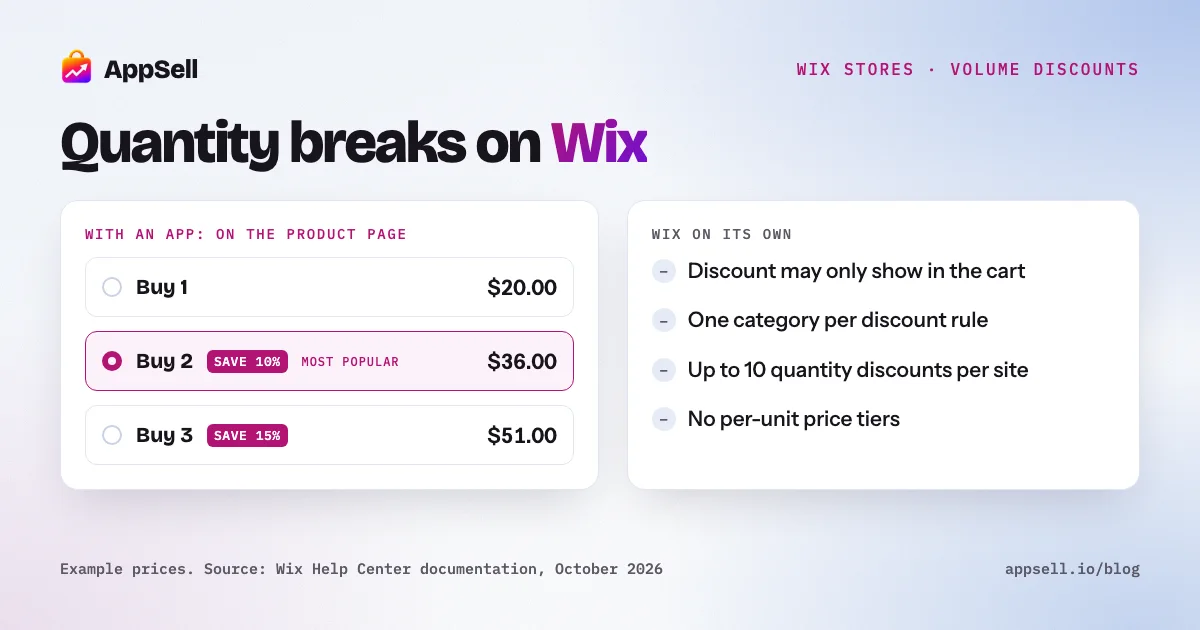
Wix can run simple volume discounts on its own, but not true quantity breaks. You can give a discount when a customer buys a minimum number of items, or set a group price such as 3 for $180. What Wix can’t do natively is lower a product’s unit price in steps as the quantity goes up, and its discounts don’t reliably show on the product page, where the buying decision happens.
This guide covers both native options, their limits, how to choose tiers that protect your margin, and when an app is worth adding.
Wix volume discounts at a glance
- Native option 1: an automatic discount with a minimum quantity, as a percentage or amount off.
- Native option 2: a quantity discount that sets a group price, with up to 10 quantity discounts per site.
- Not native: per-unit price tiers on a single product. Wix lists this as a feature request.
- Visibility: discounts with a minimum requirement may only appear in the cart and at checkout.
- Stacking: coupons and automatic discounts are independent, so a customer can get both.
What is a volume discount?
A volume discount lowers the price per unit when a customer buys more of the same product. You’ll also see it called a quantity break, tiered discount, bulk discount or “buy more, save more”. A typical offer looks like this:
- Buy 1: full price
- Buy 2: save 10%
- Buy 3: save 15%
It’s different from a bundle, which discounts different products bought together (see our guide to product bundles on Wix). Volume discounts work best for products people use up, give as gifts, or naturally buy in multiples.
Can you do volume discounts on Wix without an app?
Yes, in two ways, both built on Wix’s automatic discounts. Neither needs code, and both apply automatically in the cart, so the customer doesn’t type a coupon.
Option 1: a minimum-quantity discount
Create a standard automatic discount, choose a percentage or amount off, apply it to all items, specific items or a category, and set a minimum quantity. For example: buy 3 or more from the Candles category, save 15%.
This is the right choice for a single “buy more, save more” threshold. Two details matter:
- Only items covered by the discount count toward the minimum. If the discount applies to Candles, a mug in the same cart doesn’t help the customer reach 3.
- Amount-off discounts apply to each qualifying item, not once per order.
Option 2: a quantity discount with tiers
Wix’s quantity discount type sets a total price for a number of items. Wix’s own example is 3 shirts for $180, 4 for $200 and 5 for $225. Each tier is a separate discount applied to the same category, and you can create up to 10 quantity discounts per site.
This is the closest Wix gets to tiered pricing. It works well when you think in package prices (“3 for $180”) rather than percentages.
What are the limits of Wix’s native volume discounts?
The limits are about scope, stacking and visibility. All of them come from Wix’s own documentation:
- No per-unit price tiers. You set one price per product or variant. Wix’s help center lists automatically lowering the unit price as quantity rises (1 for $10, 2 for $8 each, 3 for $7 each) as a feature request.
- One category per rule. A discount can’t span several categories. The workaround is a new category that holds every product in the offer.
- One automatic discount per item. Only one automatic discount applies to each item in an order, and Wix advises against overlapping automatic discounts on the same products. Plan tiers so they don’t fight each other.
- Coupons stack. Coupons and automatic discounts work independently, so a customer with a coupon can get both. Run the numbers with a coupon on top before you launch.
- The discount may be invisible on the product page. Wix always shows automatic discounts in the cart and at checkout. But the discounted price may not appear next to an item when the discount has a minimum requirement, or when the product has variants with different prices.
That last point matters most. A volume discount changes behavior only if shoppers see it before they choose a quantity. If they first learn about it in the cart, most will already have decided to buy one.
How do you choose volume discount tiers that keep your margin?
Start from your profit per order, not from a standard percentage. A tier is worth offering when a multi-unit order earns more total profit than a single-unit order, even though each unit earns less.
Here’s a worked example for a product that sells for $20 and costs you $8, with $5 of shipping you pay per order:
| Order | Revenue | Product cost | Shipping | Profit |
|---|---|---|---|---|
| 1 unit, full price | $20.00 | $8.00 | $5.00 | $7.00 |
| 2 units, save 10% | $36.00 | $16.00 | $5.00 | $15.00 |
| 3 units, save 15% | $51.00 | $24.00 | $5.00 | $22.00 |
Each tier makes more money than the one before, mainly because the shipping cost is spread across more units. Run the same table with your own costs, payment fees, and any coupon a customer might stack on top. If a tier makes less profit than a single unit, raise the minimum quantity or lower the discount.
A few rules of thumb that hold up across most stores:
- Start with two tiers. Buy 2 and buy 3 are easy to understand. Add a third only if customers already buy in larger quantities.
- Make the first tier an easy step. If some customers already buy 2, put the first discount at 2.
- Leave a clear gap between tiers, so the higher tier feels worth the extra item.
- Exclude products with thin margins. A discount on a low-margin product can turn a sale into a loss.
Which products suit volume discounts?
Products people use up, buy in sets, or give as gifts. Good candidates:
- Consumables: coffee, supplements, skincare, pet food, candles.
- Everyday multiples: socks, basic tees, phone cables.
- Giftable items: cards, small accessories, anything bought for several people.
Volume discounts are a poor fit for one-off purchases like furniture or electronics, where nobody needs two. For those, a cross-sell of a related accessory works better.
How should you show volume discounts to shoppers?
On the product page, next to the quantity choice, with the saving spelled out. The offer has to be seen while the customer is choosing how many to buy. What works:
- List each tier with its per-unit price and the saving, not just a percentage.
- Let the customer pick a tier with one tap, rather than typing a quantity.
- Mark one tier, for example “most popular”, to make the choice easier.
- Repeat the saving in the cart, so the customer sees the discount was applied.
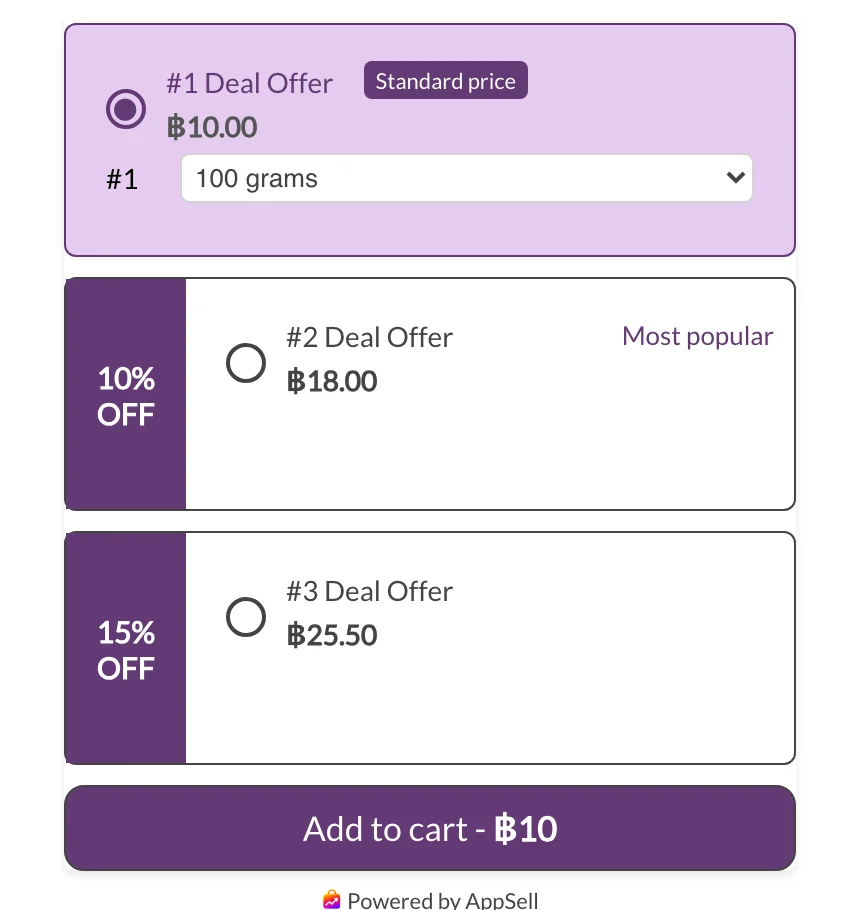
Wix’s native discounts handle the cart and checkout. The product-page display is the part they can’t guarantee.
Wix on its own vs. with a volume discount app
| Wix on its own | With a volume discount app | |
|---|---|---|
| Per-unit price tiers | Not available (feature request) | Tiers per product |
| Group pricing (3 for $180) | Quantity discounts, up to 10 per site | Usually supported |
| Shown on the product page | Not guaranteed with minimum requirements | Tier selector on the product page |
| Choosing a tier | Customer changes the quantity | One-tap tier selection |
| Scope | One category per rule | Per product, per category or store-wide |
| Applied at checkout | Automatically | Automatically, through Wix discounts or coupons |
When should a Wix store use an app for volume discounts?
When you want the tiers seen on the product page, or need tiers per product rather than per category. If a single “buy 3, save 15%” on one category is enough, Wix’s native discount does the job, and you can explain it in the product description. Once you want a visible tier selector, different tiers for different products, or the discount combined with other offers, an app is simpler than managing a stack of category rules.
Setting it up with AppSell
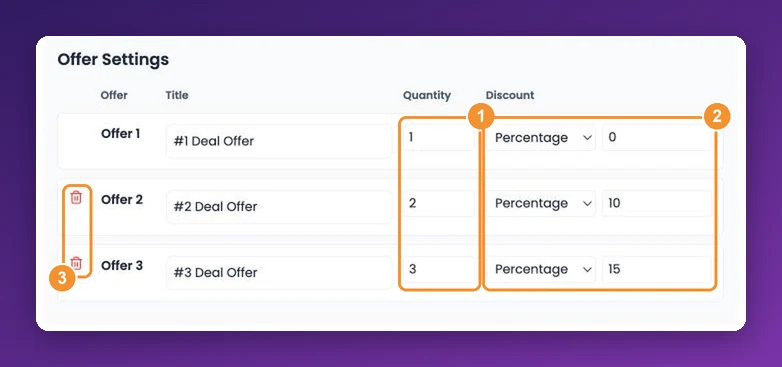
AppSell’s Volume Bundle Discount offer adds quantity tiers to your Wix product pages, such as 2 for 10% off and 3 for 20% off, with the discount applied automatically at checkout.
Frequently asked questions
- Does Wix have volume discounts?
- Partly. Wix Stores can apply an automatic discount when a customer buys a minimum quantity, and it has a quantity discount type that sets a group price, such as 3 shirts for $180. What Wix can't do natively is lower the unit price of a single product in steps as the quantity rises. Wix lists that as a feature request.
- How do I create multiple discount tiers on Wix?
- Create a separate quantity discount for each tier, for example 3 items for $180, 4 for $200 and 5 for $225, all applied to the same category. Wix allows up to 10 quantity discounts per site. Test the tiers with real carts, because only one automatic discount applies to each item.
- Will customers see the volume discount on the product page?
- Not always. Wix always shows automatic discounts in the cart and at checkout, but the discounted price may not appear next to an item when the discount has a minimum requirement or the product has variants with different prices. Shoppers often find out about the discount only once they're in the cart.
- Do Wix coupons stack with automatic discounts?
- Yes. Wix treats coupons and automatic discounts as independent, so a customer can get both on the same products. Check that your tiers still make money if a coupon is applied on top.
- Can a Wix volume discount cover products from different categories?
- Not in one rule. A minimum-quantity discount counts only items in the category it applies to. To include products from several categories, put them all in a new category and apply the discount to that.
- What's the difference between a volume discount and a bundle?
- A volume discount rewards buying more of the same product, such as 2 bags of coffee for 10% off. A bundle discounts different products bought together, such as a camera with a memory card. Volume discounts suit products people use up or buy in multiples; bundles suit products that complement each other.
- What discount should I offer for buying more?
- Work it out from your margin rather than copying a common number. Calculate the profit on one unit, then on the tier with the discount applied, including shipping and payment fees. A tier is worth offering when the order makes more total profit than a single-unit order, even though each unit earns less.