
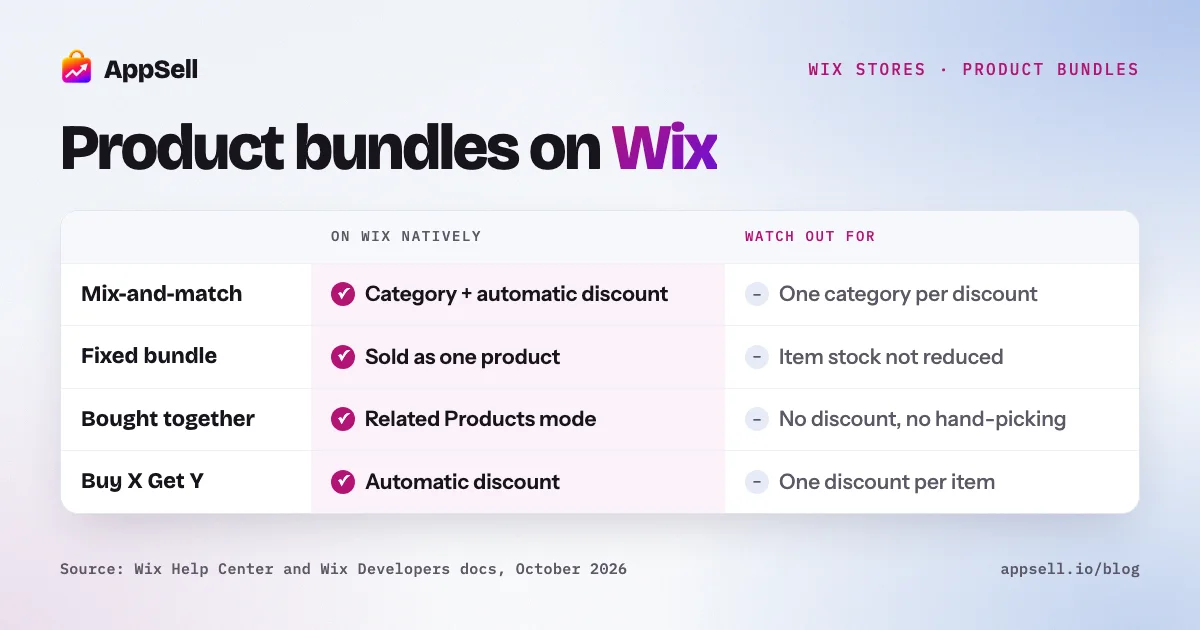
You can sell bundles on Wix without an app, but only some kinds, and with real limits. Wix supports mix-and-match bundles (a category plus an automatic discount), fixed bundles sold as one product, digital bundles as a zipped file, and Buy X Get Y offers. Wix has no bundle product type, a fixed bundle doesn’t reduce the stock of the items inside it, and its “frequently bought together” suggestions can’t be hand-picked or discounted.
This guide covers the five ways to bundle on Wix, how to set up the native ones, their limits, and when an app is worth adding.
Wix product bundles at a glance
- Native: mix-and-match discounts, fixed bundles as one product, digital zip bundles, Buy X Get Y, a “frequently bought together” gallery mode.
- No bundle product type: products are either physical or digital.
- Inventory: a fixed bundle has its own stock, not linked to its items, unless you use Wix’s Velo Bundle Products package.
- Discount limits: one category per discount, one automatic discount per item, up to 10 quantity discounts per site, and coupons stack on top.
- Not supported natively: bundles mixing physical and digital products.
What types of bundles can you sell on Wix?
Five, and they solve different problems. Choosing the right type matters more than any setting.
| Type | What it is | Native on Wix? | Main limit |
|---|---|---|---|
| Mix-and-match | Customer picks any N items from a set, gets a discount | Yes, category + automatic discount | One category per discount |
| Fixed bundle | A set of specific products sold at one price | Yes, as one product | Stock isn’t linked to the items inside |
| Frequently bought together | Items suggested next to the product being viewed | Partly, as a gallery mode | Can’t hand-pick or discount |
| Volume discount | More units of the same product, lower unit price | Partly, minimum-quantity discounts | No per-unit price tiers |
| Buy X Get Y | Buy one thing, get another free or reduced | Yes, automatic discount | Works on the cheaper item in some setups |
Volume discounts are covered in depth in our guide to volume discounts on Wix. The rest of this guide covers the other four.
How do you create a mix-and-match bundle on Wix?
Put the eligible products in one category and create an automatic discount for that category with a minimum quantity. It’s fully native and needs no code:
- Create a category for the bundle, for example “Build your gift box”, and add every eligible product to it.
- Go to Automatic Discounts and create a standard discount.
- Apply it to the bundle category and set a minimum quantity of items.
- Choose the discount, such as a percentage off.
- Show the offer on the category page or in a gallery with an Add to Cart button, and explain it in the category description.
You can add tiers to the same category, such as 4 items for 10% off and 8 for 15% off. Wix’s own example goes up to 10 items for 20% off.
Three things to know:
- Customers can still buy items one at a time at full price. The discount only applies once they reach the quantity.
- Only items in the category count toward the minimum.
- One category per discount. For a bundle drawn from several categories, create a new category that contains all of them.
How do you sell a fixed bundle on Wix, and what happens to inventory?
Create the bundle as an ordinary product with its own price. A “Starter kit” with a cleanser, a serum and a moisturizer becomes one product in your catalog, with its own photos, description and price.
The catch is inventory. Wix tracks stock for that bundle as a single product. Selling a starter kit doesn’t reduce the stock of the cleanser, the serum or the moisturizer. If those items also sell on their own, you have to adjust stock by hand, or risk selling bundles you can’t fulfill.
Wix offers one native fix: the Bundle Products package for Velo, Wix’s development platform. You create the bundle as a product, then link it to its child products in a collection. Paid orders then reduce stock for the bundle and for each item in it. Two limits: it needs that collection set up, and it doesn’t support products whose inventory is managed by variant, such as sizes or colors.
Two more native limits worth knowing:
- Digital bundles work by zipping the files into one digital product.
- Physical and digital items can’t be combined in one native bundle.
Does Wix have “frequently bought together”?
Yes, as one of the three modes of the Related Products gallery, but it’s a suggestion strip, not a bundle offer. In that mode, Wix chooses products from your store’s sales data. You can’t choose which products appear for each item, there’s no bundle discount, and there’s no “add all to cart” option in Wix’s documentation. A new store with few orders sees its All Products category instead.
For how the gallery picks products and how to steer it, see our guide to related products on Wix.
How is Buy X Get Y different from a bundle?
Buy X Get Y rewards a purchase with a second item, rather than pricing a set. It’s a native automatic discount: the customer buys a minimum quantity or spends a minimum amount, and gets an item free or at a reduced price. It can be the same product (“buy 2, get 1 free”) or a different one (“buy 2 shirts, get a hat at 50% off”). In setups where the reward could be several items, the less expensive item is the one discounted. It works well for introducing a new product alongside a best seller.
What are the limits of Wix’s native bundle discounts?
Bundles on Wix are built from automatic discounts, so they share their rules. All of these come from Wix’s documentation:
- One automatic discount per item. Overlapping discounts on the same product don’t stack.
- Coupons stack. Coupons and automatic discounts work independently, so a customer can get a bundle discount and a coupon. Check your margin with both applied.
- Up to 10 quantity discounts per site.
- One category per discount.
- Not every sales channel applies them. Automatic discounts aren’t applied on Amazon or eBay checkouts, and some Wix point-of-sale devices don’t apply them.
- Variants have limits. A product can have up to 6 options and 1,000 variants in total, and the Velo package doesn’t support variant inventory.
How should you choose and price products for a bundle?
Bundle products that solve one need together, and price the bundle so the saving is obvious.
- One need, one bundle. “Everything for your first espresso” works; a random set of best sellers doesn’t.
- Two to four products keeps it easy to understand.
- Pair a best seller with something newer to introduce products customers haven’t tried.
- Show the saving. List the separate prices next to the bundle price.
- Check the margin per bundle, including shipping, and with a coupon on top, since Wix lets coupons stack.
- Keep stock in sync. If a fixed bundle shares items with individual products, plan how you’ll keep inventory accurate.
When do you need a bundle or upsell app on Wix?
When you want to choose the products, discount them together, and show them where customers decide. Wix’s native tools cover category bundles and simple promotions. An app is worth it when you want hand-picked “frequently bought together” sets for each product, a bundle discount without restructuring your categories, or the offer on the product page and in the cart with a one-tap add.
Setting it up with AppSell
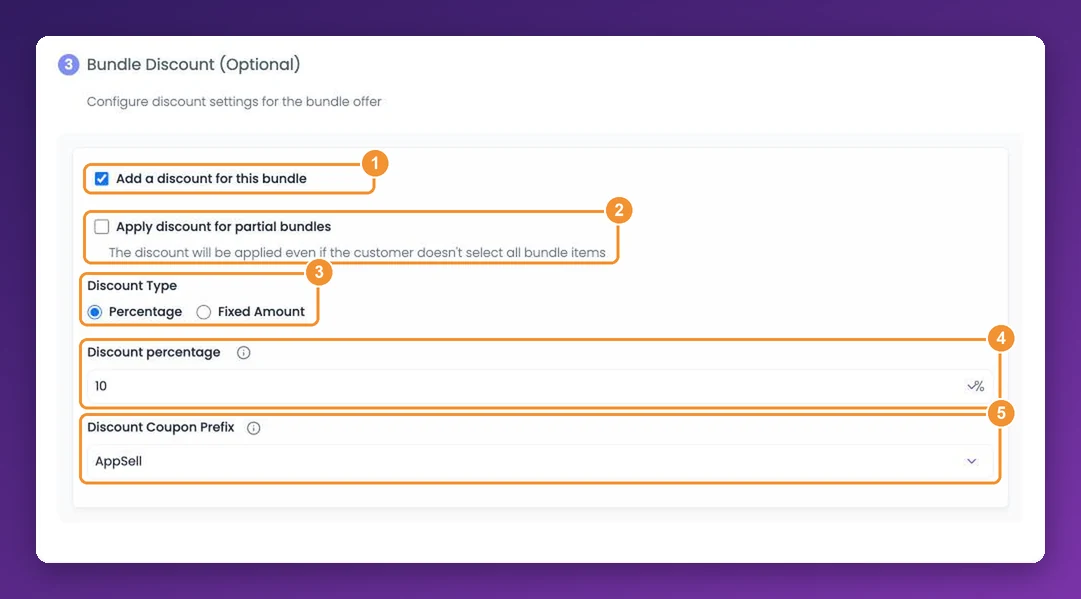
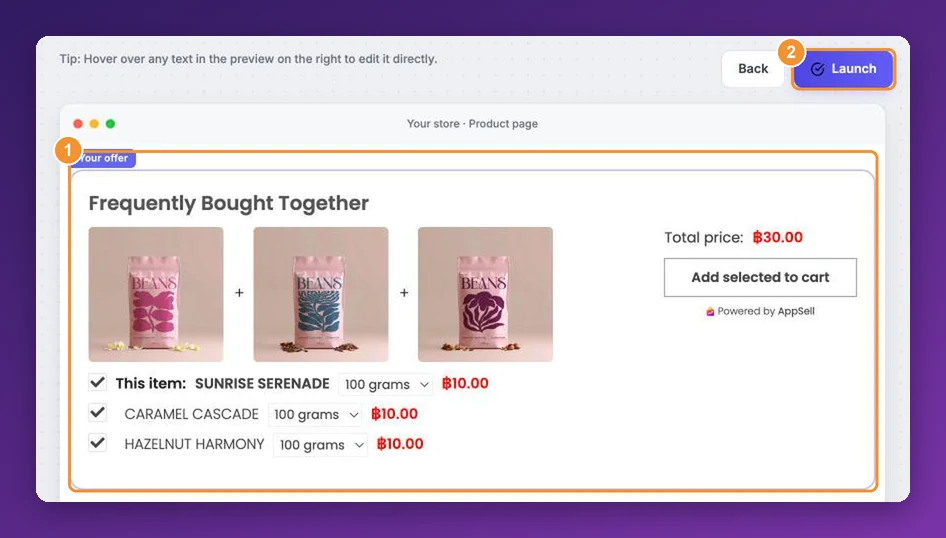
AppSell adds Amazon-style frequently-bought-together sets to your Wix product pages and cart, with the products you choose, an optional discount, and an “Add selected to cart” button. It also adds volume bundle discounts to product pages.
Frequently asked questions
- Can you sell product bundles on Wix without an app?
- Yes, in limited forms. Wix supports mix-and-match bundles through a category and an automatic discount, fixed bundles sold as one product, digital bundles as a single zipped file, and Buy X Get Y discounts. What it doesn't do natively is reduce the stock of each item when a fixed bundle sells, or combine physical and digital products in one bundle.
- Does Wix have a bundle product type?
- No. Wix Stores products are either physical or digital. A fixed bundle is created as an ordinary product with its own price and its own stock.
- Does selling a bundle reduce the stock of each product on Wix?
- Not when the bundle is an ordinary product: Wix tracks its inventory as one product, separate from the items inside it. Wix's official Velo Bundle Products package links a bundle to its child products so paid orders reduce stock for both, but it doesn't support products whose inventory is managed by variant.
- Can a Wix bundle discount include products from different categories?
- Not directly. A discount applies to one category, so put every product in the bundle into a new, dedicated category and apply the discount to that.
- Can customers still buy bundle items individually?
- Yes. With a mix-and-match bundle, customers can buy any item on its own at full price. The discount only applies once they reach the required quantity.
- Do Wix bundle discounts stack with coupons?
- Yes. Coupons and automatic discounts work independently, so a customer can get both. Only one automatic discount applies to each item, though, so overlapping bundle and sale discounts don't stack with each other.
- Does Wix have frequently bought together?
- Yes, as a mode of the Related Products gallery. It suggests products automatically from your store's sales data, without a bundle discount, and Wix doesn't let you choose the products for each item.
- What's the difference between a bundle and a volume discount?
- A bundle groups different products, like a camera with a memory card and a case. A volume discount rewards buying more of the same product, like 3 bags of coffee for 15% off.