
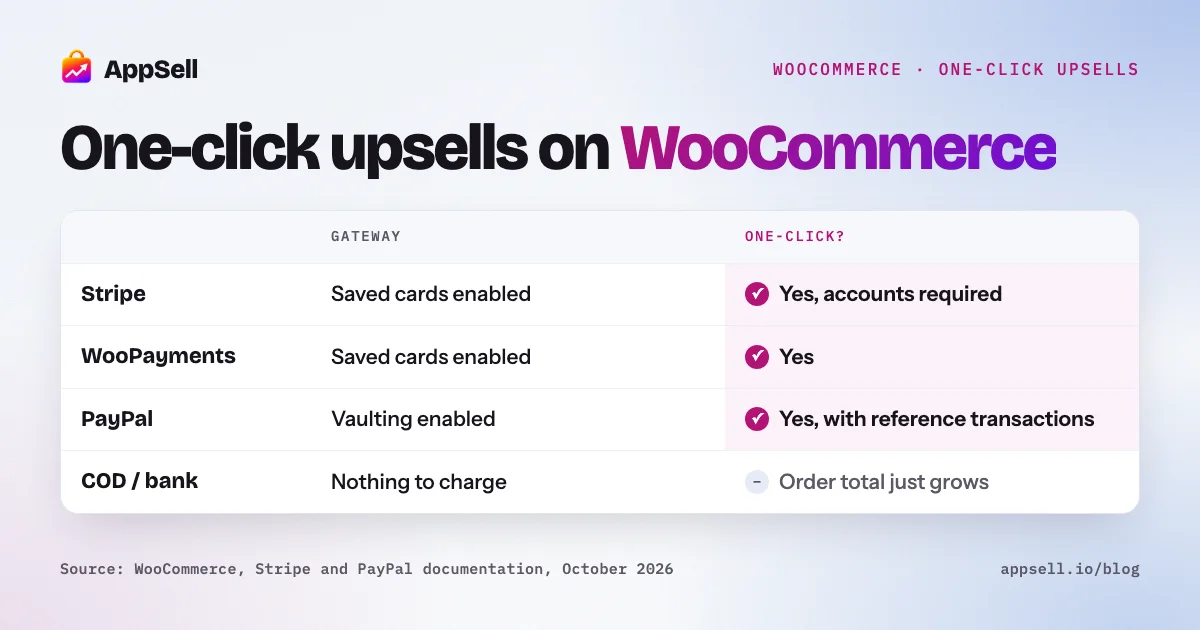
A one-click upsell on WooCommerce charges the customer’s saved payment method after the order, so they accept an extra item without re-entering card details. WooCommerce core doesn’t do this on its own: it comes from a plugin, and it only works with payment gateways that can save a payment method and charge it later, such as Stripe with saved cards, WooPayments, or PayPal with vaulting. Offline methods like cash on delivery just add the item to what the customer owes.
This guide explains how the “one click” works, which gateways support it, what changes in Europe, and what to check before you turn it on.
WooCommerce one-click upsells at a glance
- Not in core: WooCommerce has up-sells (product page) and cross-sells (cart), nothing after checkout.
- How it works: a payment token saved at checkout is charged again by the gateway.
- Gateways: Stripe (saved cards on), WooPayments (saved cards on), PayPal Payments (vaulting; PayPal accounts need reference transactions).
- Offline methods: cash on delivery and bank transfer don’t charge anything; the order total just grows.
- Europe: saved-card charges can be merchant-initiated and outside SCA, but the bank can still ask for authentication.
What is a one-click upsell on WooCommerce?
An offer shown right after checkout that the customer accepts with one click, charged to the payment method they just used. It usually appears on a page between checkout and the order confirmation, or on the confirmation page itself.
It’s different from two similar offers:
- An order bump is a checkbox on the checkout page, added before payment.
- A cross-sell is a suggestion on the product or cart page, before the customer checks out.
Does WooCommerce have upsells built in?
Yes, two kinds, but neither is a post-purchase offer. WooCommerce calls them linked products, and you set them in each product’s Linked Products tab:
- Up-sells appear on the single product page, under the description, with the heading “You may also like…”. They’re usually a better or pricier version of the product.
- Cross-sells appear on the cart page, under the cart table, with the heading “You may be interested in…”. They’re items to add alongside what’s in the cart.
- Related products are generated automatically from shared categories and tags.
All three are shown in random order. If your store uses the block-based Cart, cross-sells come from a cross-sells section in the Cart block that can pull products from what’s in the cart.
The order confirmation page has developer hooks for adding content, but no upsell feature. One-click post-purchase offers need a plugin.
How does the “one click” actually charge the customer?
Through a saved payment token. Since WooCommerce 2.6, the Payment Token API lets a gateway save a reference to a customer’s payment method. WooCommerce stores the token; the gateway uses it to charge the payment processor.
The sequence for a one-click upsell:
- The customer pays at checkout, and the gateway saves a token for that payment method.
- The upsell plugin shows an offer.
- When the customer clicks to accept, the plugin asks the gateway to charge the saved token for the extra amount.
- The item is added to the original order or created as a separate order, depending on the plugin.
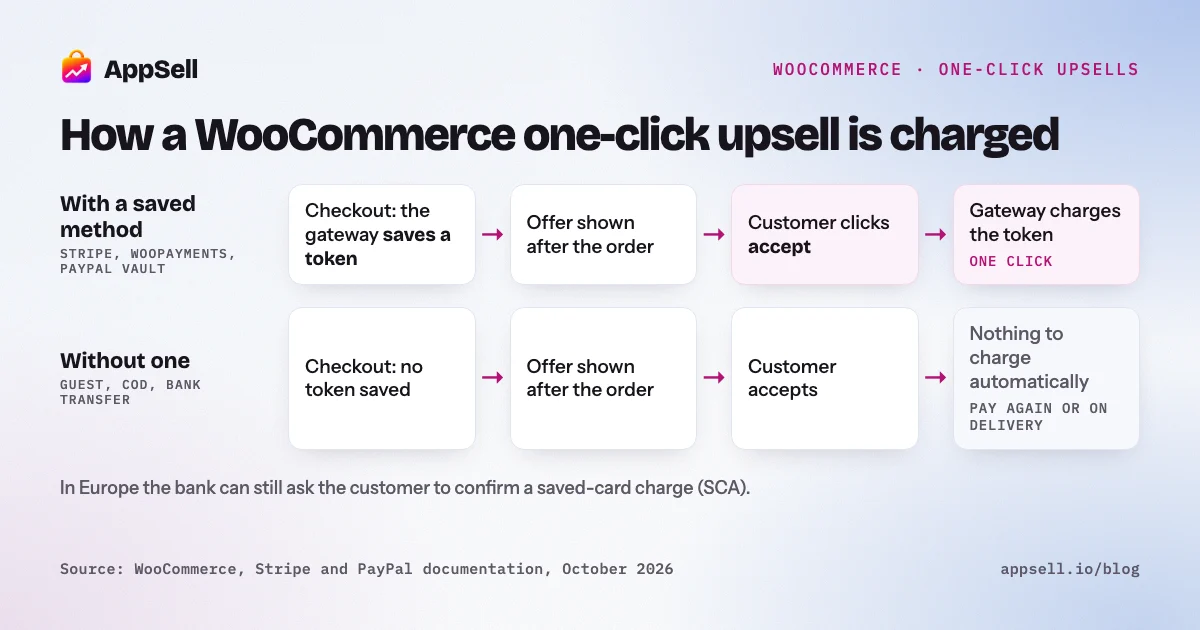
The key point: the gateway does the charging. If your gateway can’t save a payment method and charge it later, there’s no one-click upsell, whatever the plugin says.
Which payment gateways can charge a one-click upsell?
Gateways that support saved payment methods, with that feature switched on. Use this as a checklist:
| Gateway | What to enable | Watch out for |
|---|---|---|
| WooCommerce Stripe | “Enable saved card payment methods” | Requires account creation; guest checkouts can’t save payment information |
| WooPayments | “Enable payments via saved cards” | Card details are stored with WooPayments, not on your site |
| WooCommerce PayPal Payments | Vaulting | PayPal and Venmo accounts need reference transactions; turning on vaulting disables Pay Later |
| Cash on delivery | Nothing to charge | The order total grows; the customer pays on delivery |
| Bank transfer (BACS) | Nothing to charge | The order waits on hold until you confirm the payment |
Support also depends on your upsell plugin: each one lists the gateways it works with.
Do I need PayPal reference transactions?
Only to charge a saved PayPal or Venmo account after checkout. Reference transactions let you charge a customer’s PayPal account later under a billing agreement they approved once. Three things to know:
- They’re not on by default. PayPal approves them per merchant account, after an application.
- Saved cards don’t need them. Cards saved through PayPal’s advanced card processing can be charged without reference transactions.
- Vaulting turns off Pay Later. In WooCommerce PayPal Payments, the two are mutually exclusive.
If you can’t get reference transactions approved, PayPal account payments simply won’t qualify for one-click offers.
Do one-click upsells work in Europe with SCA?
Usually, but plan for the cases where they don’t. Strong customer authentication applies in the EEA, Switzerland and the UK. A charge made after checkout with a saved card, while the customer isn’t actively paying, can be treated as a merchant-initiated transaction. Stripe describes these as outside the scope of SCA, on two conditions:
- the card was authenticated when it was saved, and
- the customer agreed to future charges.
The customer’s bank can still ask for authentication. Then the charge fails with an “authentication required” error, and the customer has to confirm the payment. Your plugin should handle that by asking the customer to complete the payment, not by dropping the offer silently.
Stripe also recommends telling customers, in your terms, how you save payment details and letting them opt in.
What happens when the upsell payment fails?
The original order is safe; only the upsell charge fails. A decline or an authentication request affects the extra charge, not the purchase the customer already made. Check how your plugin handles it: it should tell the customer clearly and offer a way to pay, rather than adding an unpaid item to the order.
Does the upsell go on the original order or a new order?
It depends on the plugin, and each has trade-offs.
- Added to the original order: one shipment, one confirmation, one invoice. Simpler for the customer and for fulfillment.
- A separate order: cleaner accounting and easier to refund on its own, but two orders to fulfill and two confirmation emails.
If you ship physical products, adding to the original order usually means fewer packages and lower shipping costs.
How do refunds work for an accepted upsell?
Refund the upsell line on its own with a partial refund. WooCommerce lets you refund specific line items. Automatic refunds return the money through the gateway. Manual refunds only record the refund in WooCommerce, so you send the money back yourself, which is the norm for cash on delivery and cheque payments.
What should you check before turning on one-click upsells?
- Your gateway supports saved payment methods, and the setting is on.
- Customers can create accounts, if your gateway needs them to save cards.
- PayPal reference transactions are approved, if you want PayPal accounts to qualify.
- Your terms explain how payment details are saved, and customers can opt in.
- Your plugin handles declines and authentication requests clearly.
- You know whether upsells are added to the original order or create a new one.
- You’ve placed a real test order, accepted an offer, and refunded it.
Setting it up with AppSell
AppSell’s WooCommerce plugin adds upsell, cross-sell and bundle offers to your product, cart and checkout pages, and post-purchase offers that are one-click with gateways that support saved payment methods. It installs as a standard WordPress plugin without editing your theme. For how post-purchase offers compare across platforms, read post-purchase upsells on Wix, Shopify and WooCommerce.
Frequently asked questions
- Does WooCommerce have one-click upsells built in?
- No. WooCommerce core has up-sells on the product page and cross-sells on the cart page, but nothing after checkout. One-click post-purchase upsells come from a plugin that charges the customer's saved payment method.
- How does a one-click upsell charge without asking for card details again?
- WooCommerce's Payment Token API lets a payment gateway save a reference to the customer's payment method. After the order, the plugin asks the gateway to charge that saved method again for the extra item, without the customer re-entering anything.
- Which payment gateways support one-click upsells on WooCommerce?
- Gateways that support saving payment methods and charging them later: for example the WooCommerce Stripe extension with saved cards enabled, WooPayments with saved cards enabled, and WooCommerce PayPal Payments with vaulting. Offline methods like cash on delivery and bank transfer don't charge anything, so the upsell simply adds to the amount the customer owes.
- Do I need PayPal reference transactions for one-click upsells?
- To charge a saved PayPal or Venmo account after checkout, yes. Reference transactions aren't enabled by default: PayPal approves them per account. Saved cards through PayPal's advanced card processing don't need them.
- Do one-click upsells work with guest checkout?
- Often not with saved cards. The WooCommerce Stripe extension, for example, needs account creation enabled because guest checkouts can't save payment information. Check how your gateway handles guests before relying on one-click offers.
- Do one-click upsells work in Europe under SCA?
- They can. A charge made after checkout with a saved card can count as a merchant-initiated transaction, which is outside the scope of SCA if the card was authenticated when it was saved and the customer agreed to it. The bank can still ask for authentication, in which case the charge fails and the customer has to confirm the payment.
- How do I refund just the upsell item?
- Use a partial refund on that line item. Automatic refunds go back through the gateway; manual refunds only record the refund in WooCommerce, so you return the money yourself, which is the usual case for cash on delivery and cheque payments.
- What's the difference between an order bump and a one-click upsell?
- An order bump is a checkbox offer on the checkout page, added before the customer pays. A one-click upsell appears after the order is placed and is charged separately to the saved payment method.
References
- WooCommerce Developer Docs: Payment Token API
- WooCommerce: Stripe extension settings guide
- WooCommerce: WooPayments settings guide
- WooCommerce: PayPal Payments, saving payment methods
- WooCommerce: PayPal reference transactions
- PayPal Developer: Save payment methods
- Stripe Docs: SCA exemptions
- Stripe Docs: Save and reuse payment methods
- WooCommerce: Related products, up-sells and cross-sells
- WooCommerce: Cart block
- WooCommerce: Refunds