
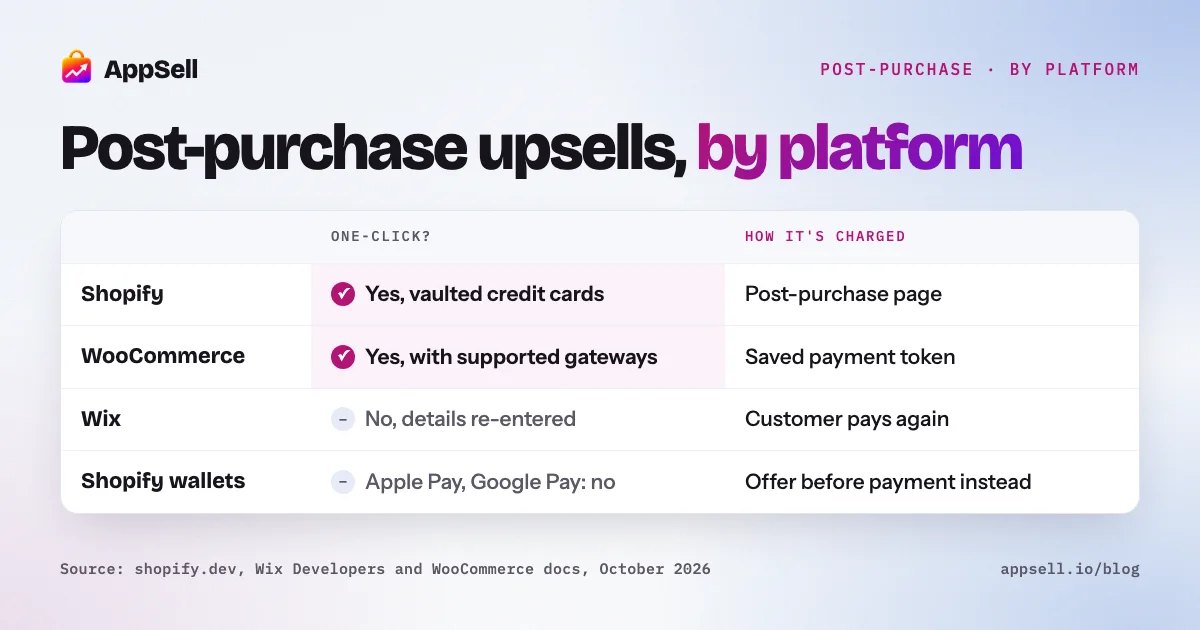
Shopify and WooCommerce allow one-click post-purchase upsells, with conditions; Wix doesn’t. On Shopify, a post-purchase page shown after payment can charge the customer’s saved credit card, but not wallets like Apple Pay or installment methods. On WooCommerce, a plugin charges the saved payment method through a gateway that supports it. On Wix, the customer has to enter payment and address details again to accept an offer after the order.
This guide compares what each platform allows, how the charge works, which payment methods qualify, and what to offer.
Post-purchase upsells by platform at a glance
- Shopify: one-click on a post-purchase page, with vaulted credit cards; Basic plan or higher; up to 3 accepted offers; one app per store.
- WooCommerce: one-click through a plugin, with gateways that save and re-charge payment methods (Stripe, WooPayments, PayPal with vaulting).
- Wix: offers on the thank-you page; accepting means re-entering payment and address details.
- Thank-you page offers differ from post-purchase upsells on every platform.
What is a post-purchase upsell?
An offer shown right after the customer completes an order, for an extra product at a special price. The customer has just decided to trust you, and on platforms that allow it, accepting takes one click because the payment method is already known.
Two related offers are easy to confuse with it:
- A thank-you page offer appears on the order confirmation page. Depending on the platform, it may not be able to change or charge the order.
- A follow-up email offer arrives later and is paid as a new order.
How do Shopify, Wix and WooCommerce compare?
| Shopify | WooCommerce | Wix | |
|---|---|---|---|
| Built-in post-purchase upsells | No, through apps | No, through plugins | No, through apps |
| One-click acceptance | Yes, for eligible payment methods | Yes, with gateways that support saved payment methods | No, the customer re-enters payment and address details |
| How the extra item is charged | The post-purchase page charges the vaulted card | The gateway charges a saved payment token | The customer pays on a payment page |
| Payment methods that qualify | Vaulted credit cards | Depends on the gateway: e.g. Stripe or WooPayments with saved cards, PayPal with vaulting | Any method, since the customer pays again |
| Payment methods excluded | Apple Pay, Google Pay, Amazon Pay, Klarna, Affirm, gift cards, gateways that retain the security code | Gateways that can’t save and re-charge payment methods | None, but every acceptance takes a full payment step |
| Plan requirement | Basic Shopify or higher | None | Any plan with Wix Stores |
| Main limits | Up to 3 accepted offers; one app per store; $0.50 minimum; Online Store only | Gateway and account settings; SCA in Europe | More steps to accept, so fewer customers do |
| Thank-you page offers | Apps can show offers, but can’t change the order directly from the page | Plugins or theme hooks on the confirmation page | Apps can show offers in thank-you page slots |
The rest of this guide explains each column.
How do post-purchase upsells work on Shopify?
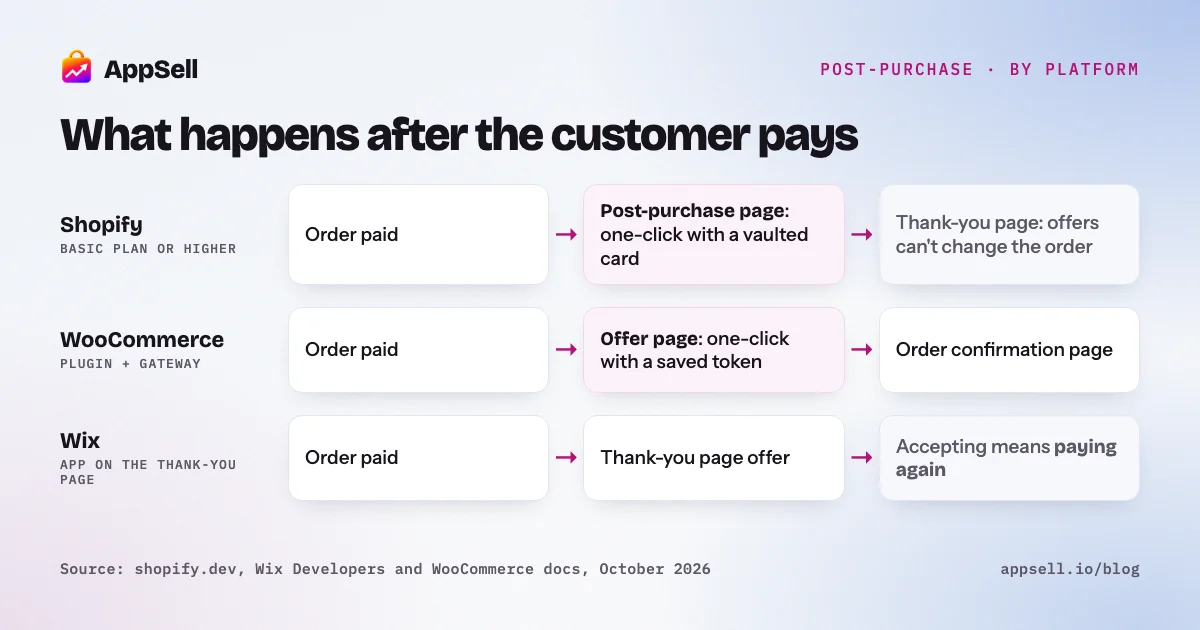
Through a post-purchase app extension: a page shown after payment and before the thank-you page. When the customer accepts, the app charges the card they just used. It’s available on the Basic Shopify plan and higher; only apps that change the information, shipping and payment steps of checkout need Shopify Plus.
Shopify’s own rules decide when the page appears:
- Payment method. The customer must have paid with a credit card that Shopify can vault. Wallets and installment methods (Apple Pay, Google Pay, Amazon Pay, Klarna, Affirm), gift cards, and gateways that must retain the card’s security code don’t qualify.
- Order. The order must come through the Online Store channel and be at least $0.50. Orders with local delivery, or with duties and multiple currencies, don’t qualify.
- Limits. A customer can accept up to three post-purchase offers per checkout, and only one app per store can run them.
- Access. The post-purchase extension is still a beta feature: it works freely in development stores, and live stores need access approved.
Shopify’s newer thank-you and order status page extensions can also show offers, but Shopify states that they can’t change the order directly. That’s why true one-click acceptance happens on the post-purchase page, not the thank-you page.
Can you do a one-click post-purchase upsell on Wix?
No. On Wix, a customer who accepts an offer after the order re-enters their payment and address details. Wix’s thank-you page settings only let you show or hide elements, change the design and edit the text. Apps can add content to the thank-you page through dedicated slots, so an offer can appear there. But Wix’s developer tools give apps no way to charge the payment method the customer just used:
- Items can be added to an order, but the updated order is paid for normally, through a payment page the customer completes.
- Saved cards exist only for members who opt in, and only the merchant can charge them, manually, from the dashboard.
That changes what works on Wix. Put quick add-ons before payment, in the cart or at checkout, where adding one costs a tap. Use the thank-you page for offers worth a second payment step, or for a coupon on the next order. Our guide to upselling on Wix covers each page.
Does WooCommerce support one-click upsells?
Yes, through a plugin and a payment gateway that can charge a saved payment method. WooCommerce core has up-sells on the product page and cross-sells on the cart page, but nothing after checkout. A post-purchase plugin uses WooCommerce’s Payment Token API: the gateway saves a token at checkout, and the plugin asks it to charge that token again when the customer accepts.
Whether it works depends on your gateway settings:
- Stripe and WooPayments: turn on saved cards. Stripe also needs customers to be able to create accounts.
- PayPal: vaulting, and for PayPal accounts, reference transactions, which PayPal approves per merchant.
- Cash on delivery and bank transfer: nothing is charged; the order total simply grows.
- In Europe: a saved-card charge after checkout can be a merchant-initiated transaction outside SCA, but the customer’s bank can still ask for authentication.
Our guide to one-click upsells on WooCommerce covers gateways, failed charges and refunds in detail.
Which payment methods block one-click offers?
Wallets, installment methods and any gateway that can’t re-charge a saved method. Across platforms:
- Shopify: Apple Pay, Google Pay, Amazon Pay, Klarna, Affirm, gift cards and gateways that retain the security code don’t qualify for the post-purchase page.
- WooCommerce: any gateway without saved payment methods, and PayPal accounts without reference transactions.
- Wix: none are blocked, because every acceptance goes through a payment step.
As more customers pay with wallets, a growing share of orders won’t see a one-click offer at all. Plan for it: keep a strong offer earlier in the purchase, in the cart or at checkout.
What should you offer after checkout?
Something that clearly goes with the order, priced well below it. What tends to work on every platform:
- A direct complement: a refill for a device, a case for a phone, a second color of the same item.
- A lower price than the original order, so accepting is an easy decision.
- One offer at a time, with a clear decline option.
- A short time limit, since the offer only exists on this page.
- On Wix, a next-order coupon often beats a second purchase, because it asks nothing of the customer now.
Setting it up with AppSell
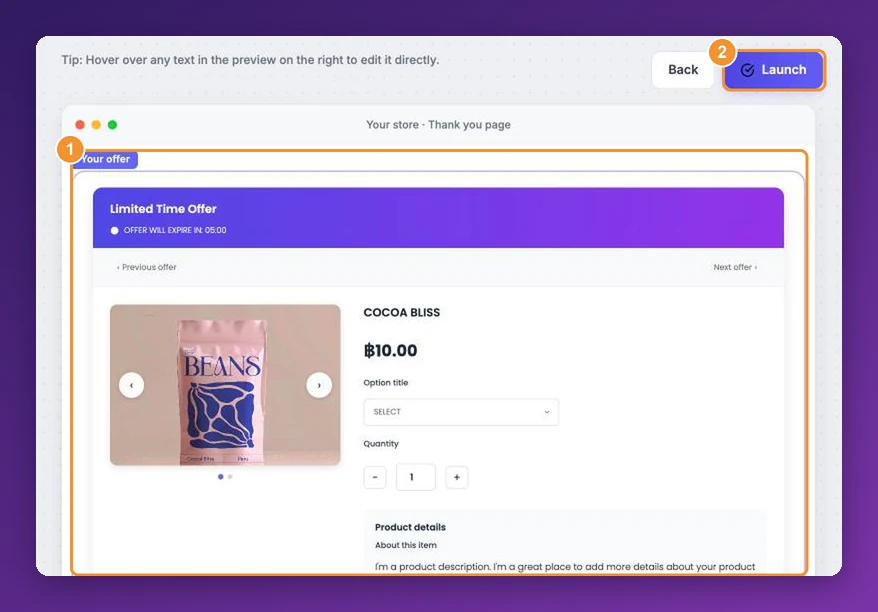
AppSell runs post-purchase offers on all three platforms: one-click on Shopify and WooCommerce with supported payment methods, and on the thank-you page on Wix. It also covers the steps before payment, on the product page, in the cart and at checkout, where quick add-ons convert best. See AppSell for Shopify, AppSell for Wix or the AppSell WooCommerce plugin.
Frequently asked questions
- What is a post-purchase upsell?
- An offer shown right after a customer completes an order, before or on the order confirmation page, for an extra product at a special price. On platforms that allow it, the customer accepts with one click and is charged with the payment method they just used.
- Which platform supports one-click post-purchase upsells?
- Shopify supports them through post-purchase app extensions, for eligible payment methods. WooCommerce supports them through plugins and payment gateways that can charge a saved payment method. Wix doesn't: the customer has to enter payment and address details again to accept an offer after the order.
- Do you need Shopify Plus for post-purchase upsells?
- No. Shopify makes post-purchase apps and thank-you page apps available on the Basic plan and higher. Only apps that customize the information, shipping and payment steps of checkout are limited to Shopify Plus.
- Which payment methods don't work with Shopify post-purchase offers?
- Shopify's post-purchase page needs a vaulted credit card. Wallets and installment methods such as Apple Pay, Google Pay, Amazon Pay, Klarna and Affirm don't qualify, nor do gift cards or gateways that require the card's security code to be retained.
- Is a thank-you page upsell the same as a post-purchase upsell?
- Not quite. A post-purchase upsell can be charged to the original payment method. A thank-you page offer appears on the order confirmation page; on Shopify, thank-you page extensions can't change the order directly, and on Wix the customer pays for the extra item separately.
- How many post-purchase offers can a customer accept on Shopify?
- Up to three accepted offers per checkout, and only one app per store can run post-purchase offers.
- Why does Wix ask customers to re-enter payment details for a post-purchase offer?
- Wix's developer tools give apps no way to charge the payment method a customer just used. Items can be added to an order, but the added balance is paid through a payment page the customer completes, and saved cards can only be charged manually by the merchant.
- What should I offer after checkout?
- A product that clearly goes with what the customer just bought, priced well below the original order, with a short time limit. On Wix, where accepting takes more steps, a coupon for the next order often works better than a second purchase.
References
- Shopify Developers: Product offers (post-purchase)
- Shopify Developers: Thank you and order status pages
- Shopify Help Center: Checkout apps
- Wix Help Center: Customizing the thank-you page
- Wix Developers: E-commerce thank-you page plugin slots
- Wix Developers: Draft orders
- Wix Help Center: Saving and charging customers' credit cards
- WooCommerce: Related products, up-sells and cross-sells
- WooCommerce Developer Docs: Payment Token API
- PayPal Developer: Reference transactions